This ia a Summary of the full guidelines written by Aaron Krowne for PlanetMath that is
also useful for PlanetPhysics.org. The full text can be read at: PlanetPhysics.org Style
Guidelines
1 PlanetPhysics Content and Style Guide Summary
1.1 Rationale
This guide is meant to be a set of suggestions revealing the “best way” to write PlanetPhysics
entries. One reason it is needed is because there are many common LaTeX pitfalls that new or even
intermediate LaTeX writers may experience, and we hope to help them here. The second is because
while there are many ways to do things both in terms of presentation style and LaTeX use, we
want to encourage writers to select the methods that will help make PlanetPhysics more consistent
and hence easier to understand.
We stress again that this is only a guide—not a forced set of rules. The owner of an entry is
assumed to be its expert, not the PlanetPhysics staff or any other users of the site. However we
appeal to each and every writer to heed this document, to help make PlanetPhysics a better
resource for all learners.
2 Content Guidelines
What to write.
2.1 Definitions
In definitions, the term (or terms) being defined should be distinguished by typesetting it in either
italics (preferred) or boldface. (See section ??.)
A basic definition-entry should give only one name and one notation (when such exists) for what is
being defined. This will make the definition as short as possible and thus easy to read. It will also
encourage a common notation/term for use at PM.
However, after the definition is given it is highly encouraged to mention examples, possible
synonyms, alternative notations, etymology, and historical comments. These items could be placed
in one or more additional sections, such as “Examples”, “Notes”, “Properties”, and so forth.
Lengthy examples should have their own entries attached to the definition.
Often an entry is lengthy, so that the definition might become difficult to distinguish from the
surrounding text. This is especially noticeable if some introductory text precedes the
definition. In such cases it is a good idea to somehow mark the definition so that it
stands out. One way to do this is to use a ready-made “definition” environment (see
below).
Sometimes, many concepts must be defined at once in a single entry. For example, it is difficult to
define “graph” without also defining “nodes” and “edges”. It makes more sense to group these
things together. These additional concepts can be listed as defined in the “defines” metadata
field of the entry. Synonyms for the main concept should be listed in the “synonyms”
field.
2.2 Theorems
In theorems, it should always be clear what the assumptions are and what are the implications.
Also, one should try to eliminate any unnecessary notation from the formulation. In particular, the
theorem formulation should not be used to set up the notation for a proof. Such unnecessary
notation will make the theorem difficult to read.
As with definitions, if the theorem is surrounded with explanatory text (as most theorems should
be), it is probably a good idea to set it off from the surrounding text in some way. A “theorem”
environment (see below) is a good way to do this. Some publication styles set theorems in slanted
text to attract attention.
2.3 Proofs
Proofs may be included in the entry for the theorem itself if they are short; they should if possible
be clearly marked as a proof, perhaps by using \begin{proof} …\end{proof} environment
(see below). If the theorem contains its own proof, the appropriate checkbox should
be set, so that the theorem does not appear on PlanetMath’s “unproved theorems”
list.
If the proof is long, it should go in its own entry, attached to the theorem itself. There’s an “add
proof” button for just this purpose. Others may attach alternative proofs to your theorems as
well.
2.4 Topics
3 Style Guidelines
How to write:
Since entries at PM are entries in an encyclopedia, each entry should stand on its own.
3.1 Logic symbols versus words
Logic symbols like ∨, ∧, ∀ and ∃ should be used sparingly. The reason is that their overuse leads to
entries that look like a stream of gibberish, which are so dense they are difficult to
read. The use of natural language logical connectives makes an entry much easier to
read.
3.2 Choice of Title
The title should be descriptive, of course, of what the entry actually is: “Fermat’s last theorem” is
good, as is “vector bundle”, but “products of connected spaces” suggests (vaguely) a list of
properties of products of connected spaces; if the entry is actually just the theorem that such
products are connected, it should read “products of connected spaces are connected”. If the
theorem is in fact an if and only if theorem but one direction is essentially trivial (as in this case),
the easy direction can be left out of the title.
You should write the title with capitalization as it would appear in an index. When using a term
within an entry, the local capitalization style will be adopted by the automatic linker. Proper
names and adjectives derived from proper names are to be capitalized to create a consistent look to
the entries. Thus, Eulerian, Euclidean, Archimedean, Henselian, Noetherian, Artinian, Abelian,
Lagrangian, and Gaussian are to be used.
3.3 Classification
It is important to select a good classification for your entry, as this helps readers find it while
browsing, and helps to steer the automatic linking system. Classification on PlanetMath uses the
AMS Mathematics Subject Classification scheme (AMS-MSC). You can search or browse this
scheme, looking for categories that match your entry.
A classification string is a list of comma-separated category codes, of the form scheme:code, where
scheme is the classification scheme. If scheme: is left out, msc is assumed (as this is the only
supported scheme at the time anyway). Codes look like NNLNN, where N is a number and L is a
letter.
The order of the category codes in a classification string is important. The first code is considered
the most important, the second is considered second-most important, and so on. In situations
where one category code must be selected to “represent” the subject of the entry, the first code will
be used.
3.4 Choice of Words
3.5 Abbreviations and Latin terms
In scientific writing, Latin terms occur frequently. However, if these are overused, they tend to
make the text quite formal. Thus, when possible, one should consider using the corresponding
English terms.
- iff is handy in notes, but in printed text, it is usually written out if and only if [1].
- e.g. is short for exempli gratia (Latin: for example).
- i.e. is short for id est (Latin: that is, in other words).
Now 1∕n converges to 0, i.e., if 𝜖 > 0, there is an N such that 1∕n < 𝜖 for all
n > N.
- et al. is short for et alia (Latin: and others).
- cf. is short for confer (Latin: compare). This abbreviation is frequently used incorrectly to
mean “see” [1]. For example, cf. [20] for a discussion, is incorrect.
- viz. short for videlicet, (Latin: it is permitted to see).
- sic.
- ad hoc
- mutatis mutandis Latin for “with the necessary changes having been made”.
3.6 Displaying Equations
Equations can be typeset as inline equations (like a = 2) or as a displayed equation;
Typically, an equation is displayed if it needs to be numbered, if it is long (and therefore
difficult to read inline), or if it defines an important quantity or is otherwise important [1].
3.7 Emphasis
When emphasizing text, the usual way to do it is to use \emph{emphasized text}. This
will look like this, or like this in italic text, or like this in bold text, or like this in
slanted text, or finally like this in typewriter text. This is the way books are
written, for good typographic reasons. If you really prefer boldface, it is available; you
will have to keep track of whether it actually looks any different from the surrounding
text.
3.8 Sentences
3.9 Paragraphs
3.10 Sectioning
3.11 Grammar
3.12 Punctuation
3.13 Flow Between Text and Mathematics
What you write should be primarily text, in the following sense: the reader should be able to read
the paragraph aloud, and it should be grammatically correct and clear, using English connectives
such as “and” and “but”. While it is possible to write many equations in one giant formula without
explanation, it should be reserved for situations when the calculations are really self-explanatory.
Even then, it is rare that more than four or five successive equalities appear in the same formula
without english text.
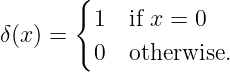
If you need small pieces of text to appear in your formulas, for example in piecewise definitions of
functions (which you do using the \begin{cases} …\end{cases} environment), use
\text{the text} which is provided by amsmath package. For instance if you type
\delta(x)=\begin{cases}
1 & \text{if }x=0\\
0 & \text{otherwise}.
\end{cases}
then the result looks like this:
3.14 Notation
If your entry depends on another entry in some essential way (say, you’re proving a theorem, or
you’re defining a special kind of a type of object they define), you need to look at their
page to check that you have the same thing in mind as the author. At the same time,
you should look at their notation. If it’s reasonable and you have no strong reason to
use a different notation, use theirs. It makes life easier for PlanetMath users. On the
other hand, if you’re really working in a different field that uses different notation, by
all means change it. Make sure readers won’t be confused by the change in notation,
by explaining it or asking the other author to explain it. If the other author is using
notation that is so bad you don’t feel you should use it in your entry, file a correction
on their page, asking them to at least mention your notation. Then use yours in your
entry.
4 The Right Way™
Tips, tricks, and advice on how to do things the right way.
4.1 Quotes
When writing text to be viewed on a computer screen, only one type of quote is used, either " or
’.
However, when writing text to be typeset and printed, two types of quotes are used “ and ” or ‘
and ’. Those writing TeX documents should be mindful of the difference. So incorrect usage is
"wrong" giving ”wrong”, while correct usage is ‘‘right’’ giving “right”. Note that in TeX both
’’ and " produce the same symbol ”, but the former is used more often because of symmetric
appeal.
4.2 → vs. 
The symbols \to (→) and \mapsto ( ) are often confused, but, as their names suggest, are
different. Writing f : A → B indicates that f is a function from a set A to a set B. On the other
hand, f : x
) are often confused, but, as their names suggest, are
different. Writing f : A → B indicates that f is a function from a set A to a set B. On the other
hand, f : x sin x indicates that f maps x to sin x, or equivalently that f is the sin
function.
sin x indicates that f maps x to sin x, or equivalently that f is the sin
function.
4.3 denoted vs. denoted by
In “The set {x ∈ ℝ∣x > 0}, denoted L, is open”, there is a missing “by”.
4.4 Ambiguous words
- this: In “From this the proof follows”, it is seldom completely clear what this refers
to. Instead, one could write something like “Combining equation (1) and (2) gives the
result.”
- it [1]: In “Condition b. in Theorem 1 does not hold for the steepest descent method.
Therefore, we shall not consider it.”, the word it can refer to both Condition b. or the
steepest descent method.
- etc. is an abbreviation for et cetera, Latin for “and the others”. An ambiguous example would
be
We can now prove that f is smooth, invertible, convex, etc.
4.5 Theorem-like and Proof Environments
When presenting a theorem, lemma, definition, remark, and similar statements, it is
customary to set it apart from the rest of the text to make them easier to notice. This can
be done usig a theorem-like environment created with the \newtheorem macro. For
example
\newtheorem{thm}{Hard Theorem}
\begin{thm}[Fermat]
There are no positive integer solutions to the equation
$x^n + y^n = z^n$ for $n>2$.
\end{thm}
gives
Hard Theorem 1 (Fermat). There are no positive integer solutions to the
equation xn + yn = zn for n > 2.
A proof can be given using the proof environment provided by the amsthm package. For
example
\begin{proof}[Simple proof]
See Wiles (1995).
\end{proof}
gives
Simple proof. See Wiles (1995). □
As mentioned above, theorem-like environments can be used for more than just theorems. This is
facilitated by the amsthm package. It provides three default styles ‘plain’, ‘definition’, and ‘remark’.
For example
\theoremstyle{definition}
\newtheorem*{defn}{Simple Definition}
\begin{defn}
An integer is \emph{even} if it is divisible by $2$.
\end{defn}
gives
Simple Definition. An integer is even if it is divisible by 2.
Note that \newtheorem* supresses numbering, unlike its unstarred cousin. Note that default
theorem styles do not have to be used in the way they are named, they simply provide different
choices of font styles for header and body of the new environment.
All contributors to PlanetMath are strongly encouraged to make use of theorem-like environments.
One reason is to set them apart from other text semantically, just as they are set apart visually.
This is especially important in an online encyclopædia which is subject to automatic indexing.
Another important reason is consistency. If everyone uses a few standard styles, this
adds greatly to a consistent look of PlanetMath as a whole. Definitions for such styles
can be added to your default preamble so that they just appear when you write an
entry.
The amsthm package provides other useful features such as the ability to define custom theorem
styles. More information can be found in guide to amsthm by Richard Kaye.
4.6 Spacing
There is often confusion betwen punctuation and mathematical symbols or operators. The symbol
itself may look the same, but it is typeset differently in different contexts. Usually, the difference is
in spacing. There are several common mistakes.
4.6.1 −: − vs. − : −
The colon symbol (:) can be used as punctuation or as an operator, both in the context of a
mathematical expression. If it is punctuation, the \colon macro should be used. If it is an operator,
then : should be used. Here are some examples:
- incorrect usage function $f: X \to Y$ gives function f : X → Y , while correct
usage function $f\colon X \to Y$ gives function f : X → Y ;
- incorrect usage ratio $4\colon 3$ gives ratio 4: 3, while correct usage ratio $4:3$
gives ratio 4 : 3.
4.6.2 − < − > − vs. −⟨−⟩−
There is common confusion between mathematical relational operators less-than (<) and
greater-than (>), and punctuation angle brackets ⟨ and ⟩. The difference must be respected. Here
are some examples:
- incorrect usage $<u,v>$ gives < u,v >, while correct usage $\langle u,v \rangle$
gives ⟨u,v⟩;
- incorrect usage $1 \langle 2$ gives 1⟨2, while correct usage $1 < 2$ gives 1 < 2.
4.6.3 −|− vs. −∣−
The vertical bar (|) symbol is often misused in mathematical expressions. It is mostly used to make
vertical bars in tables and it keeps the same meaning in mathematical expressions. The
corresponding mathematical operator is typeset with the \mid macro. So incorrect usage
$\{ x | x > 0 \}$ gives {x|x > 0}, while correct usage $\{ x \mid x > 0 \}$ gives {x∣x > 0}.
Similarly the relation “divides into” should be typeset as $n\mid m$ giving n∣m and its negation
should be typeset as $n\nmid m$ giving n ∤ m.
4.7 Operator and Function Names
LaTeX provides predefined macros for typesetting the commonly used functions such as \sin,
\cos, \exp, \log, \lim, \liminf, \limsup, \min, \max and others. In case when the
needed operator is not the one of them one can define custom operators using command
\DeclareMathOperator from package amsmath.
\DeclareMathOperator{\Tr}{Tr} % in the preamble
...
Sometimes $\Tr M$ is used to denote the \href{https://physicslibrary.org/encyclopedia/Trace.html}{trace} of $M$.
The above produces
Alternatively, if you do not intend to use a certain function or operator often, it can be typeset the
same way using the \operatornamemacro, for example $x\operatorname{Tr}M$.
4.8 Figures and Diagrams
Figures and diagrams really “bring the math to life”. We encourage everyone to consider
illustrating the concepts in their entries using figures, particularly for geometric, combinatorial, or
algebraic entries.
There are two main categories for digital encoding of images, raster and vector formats. Raster
formats store the image as a two-dimensional array of colored pixels, while vector formats
store drawing commands that can be reproduced to draw the image on any display
medium.
Vector formats are especially suited for mathematical diagrams and illustrations in a digital
medium. Hence all diagrams included in PlanetMath should be in a vector format (inline, EPS,
etc.) and not in a raster format (JPEG, PNG, GIF, etc.). Note that simply encapsulating a raster
image in an EPS file is not acceptable. If an image is drawn in the Gimp or MS Paint™, it will be
a raster image no matter what format you save it in, and it will look awful in print or in page
images mode. Moreover, in the interests of reproducibility and editability of the diagrams, the
original editable sources should be provided. Of course, there are exceptions such as
photographs or any other image whose raster nature is intrinsically justified. If you absolutely
must provide such an image (an article about the Mandelbrot set, for example), provide
it in the highest resolution you can, so that the print version has a chance of being
legible.
4.9 Including Figures
There are two main ways of including diagrams in an entry: inline and externally. Inline diagrams
are generated by code included directly in the TeX document. They are rendered using specific
packages. However, some of them only work with PostScript output and cannot be compiled
directly with PDF-LaTeX or PDF-TeX. External figures are usually EPS (Encapsulated
PostScript), PostScript, or pdf files, which can be generated with a large number of programs (see
below). Once created, they should be uploaded to the article’s PlanetMath filebox, along with the
source (for example, the FIG file if XFig was the drawing program). Including the source
alleviates concerns about compliance with the FDL license, and is just the “right thing” to
do.
4.10 Text in Math and Math in Text
. When writing inline math, LaTeX supports a number of possible syntaxes. You can write a = b
as $a=b$ or \(a=b\). There’s no major reason to prefer one over the other. When writing
displayed math, however, there is a LaTeX way (\[a=b\]) and primitive TeX way
($$a=b$$). The primitive TeX way bypasses the LaTeX formatting algorithms and
can cause poor formatting if AMS math features are used. For numbered equations,
use the \begin{equation} environment; for more complicated things like multi-line
equations, aligned sequences of equations, cases, and so on, look at the AMS math
documentation.
When writing math, it is often convenient to introduce a word or two of text into an
equation:
This should be distinguished from operators that are normally typeset upright, such as sin or Hom.
To put text in a math context, use \text{ something like this}. Note that math
environments normally ignore spaces, so if you want word spaces before or after your text,
you should include them in the argument to \text. If you want to typeset an operator
that does not have a LaTeX macro already, use \operatorname{name}. If you want
to use an operator many times, put \DeclareMathOperator{\name}{name} in your
preamble.
4.11 Bibliography
All authors are strongly encouraged to include bibliographies in their entries. Besides giving the
proper credit to the original sources a bibiliography provides a pointer to the place where more
information on the subject can be found.
The preferred way for creating bibliography is using thebibliography environment–see example
given below. At the moment BibTeXuxyz cannot be used directly. Instead the bibliography can be
created offline, and then copy-pasted from the .bbl file. One should also be advised against using
texttt(amsrefs) package because in HTML rendering mode an texttt(amsrefs) bibliography is
rendered as graphics.
When a source is available online (as a preprint, for example), then an hyperlink should be included
using the PM − linkexternal command (see htmladdnormallink(relevantdocumentation),
(http : ∕∕planetmath.org∕?op = getobjandfrom = collabandid = 33) for syntax). Links to the
pertinent (htmladdnormallink(MathSciNet), (http : ∕∕www.ams.org∕mathscinet∕search) or
(htmladdnormallink(Zentralblatt),(http : ∕∕www.emis.de∕ZMATH∕) reviews also help the
reader to find relevant sources.
References
[1] N. J. Higham, Handbook of Writing for the Mathematical Sciences, SIAM, 1998.